在完成SAN Client配置后,Windows/AIX/Linux系统中会自动发现两个Python类型的Tape Driver,但是HP-UX并不会,在日志可以看到信息如下:
/usr/openv/netbackup/bin/vxlogview -o 200 -d all
04/13/16 17:44:30.089 [Debug] NB 51216 nbftclnt 200 PID:21061 TID:1 File ID:200 [No context] 1 \
 [DiscoverDevices:HpUx] opendir failed for /dev/sctl No such file or directory
04/13/16 17:44:30.100 [Debug] NB 51216 nbftclnt 200 PID:21061 TID:1 File ID:200 [No context] 1 \
[StdDeviceInquiry] Device type 12 found on /dev/pt/pt7 Vendor/Product: "HP      OPEN-XP12000    500 "
它在干嘛?它在寻找设备,从日志可以看出它去找了两个地方/dev/sctl和/dev/pt/,会扫描这两个目录下的所有文件。
下面这个KB,指导在/dev/sctl下创建文件,供参考
https://www.veritas.com/support/en_US/article.000012701
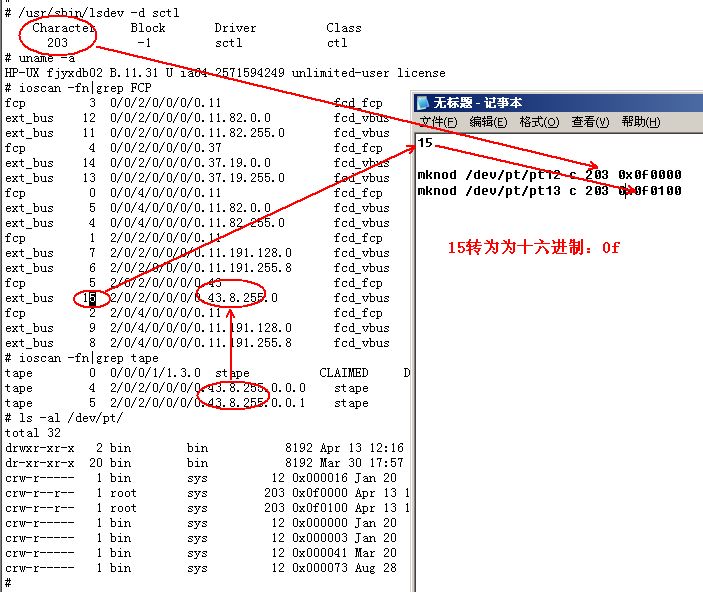
这样就可以了吗?不行,部分主机并不会去/dev/sctl下去寻找设备,而是只扫描/dev/pt目录中的文件,所以建议使用/dev/pt路径创建文件,简要如下: 使用mknod命令创建文件,创建前查看/dev/pt目录,不要与现有文件冲突,如图所示,需要将ext_bus地址转换为16进制。
在线转换地址(自己会算更好!):http://tool.oschina.net/hexconvert/**
没完!还有问题!通常情况下,FT Media Server配置完成,Zone创建后,系统能够扫描到Python Tape Driver,可是通常HPUX中并不能看的,或者显示为NO_HW,在syslog.log中有如下显示:
ext_bus    63  3/0/10/1/0/4/0.101.12.255.0      fcd_vbus    NO_HW       INTERFACE    FCP Device Interface
target    176  3/0/10/1/0/4/0.101.12.255.0.0    tgt         NO_HW       DEVICE
tape        7  3/0/10/1/0/4/0.101.12.255.0.0.0  stape       NO_HW       DEVICE       ARCHIVE Python
tape        8  3/0/10/1/0/4/0.101.12.255.0.0.1  stape       NO_HW       DEVICE       ARCHIVE Python

Mar  1 11:13:58 FTclient1 vmunix: class : lunpath, instance 3104
Mar  1 11:13:58 FTclient1 vmunix: Evpd inquiry page 83h/80h failed or the current page 83h/80h data do not match
the previous known page 83h/80h data on LUN id 0x0 probed beneath the target path (class = tgtpath, instance = 37)
The lun path is (class = lunpath, instance 3104).Run 'scsimgr replace_wwid' command to validate the change
这是由于LUN Path路径冲突造成的,可以通过以下办法解决:
Validate that the devices are ARCHIVE  Python and if so, run the HPUX  command:

scsimgr -f replace_wwid -C lunpath -I  XXXX
replacing XXXX with the lunpath from the syslogd error message or the lunpath from the output of

ioscan -fN|grep lunpath|grep tape
for the NO_HW  devices.